
Quicker Trades, Clearer Investment Decisions — Summer Update 2025
- Share.Market
- 5 min read
- 22 Jul 2025


From a brand new segment to smarter trading tools and fine-tuning the features you already love, we’ve been busy building all summer long. These updates are sure to brighten your experience, making it faster and more convenient, rain or shine!
Let’s take a look:
The Wait is Over — Mutual Funds are Now on Share.Market!
What’s New?
Unified Management of Investments
Track and manage both stocks and mutual fund investments using a single app. If you’ve already been investing or trading in other segments of the capital markets, or have invested in Mutual Funds through the PhonePe App, you’ll find an aggregate view on the Share.Market app.
CRISP for Evaluation of Mutual Funds — Cause it’s 2025!
CRISP (Consistency, Risk and Investment Style of Portfolio) helps you analyse more than historical returns. It helps you understand:
- Does the fund deliver returns consistently?
- Does it lean towards Quality, Value, or Momentum?
- How risky is your fund as compared to its peers?
This framework combines performance and risk assessment with analysis of historical fund portfolios to deliver unbiased, actionable insights that empower you to make smarter and more informed fund selection decisions.
Peer Comparison & Performance Tracking
- Compare any fund to its category average and directly with its peers.
- Find detailed breakdowns by asset class, market capitalization, sector, and credit quality, so that you can invest with clarity.
Investment Ideas
Discover investment ideas with a curated list of funds powered by CRISP. Whether you are looking to start a SIP or seeking a high-growth fund, our Investment Ideas can help you get started.
Taking a Step Further — Introducing Trade From Charts
You asked for more control, and we listened. Our Trading Panel is already receiving appreciation for enabling trading without switching screens. It has made it easier to track positions, orders, and option chains, alongside charts. However, we are excited to announce that Trade From Charts takes things a step further!
Visualize, Place, and Modify Trades from the Chart
See your positions and orders as lines on the chart, updating with every price move. This means you can spot opportunities, track progress, modify, and place orders from the chart itself, with precise control!
The + Button
Create orders the same way you’ve been using the + button to draw lines. This will show up as an order/position once you place an order on the chart.
Set, Trade, Relax — Cover Orders Have Your Back
- Enter a position and set a stop loss in one go!
- Stay protected even when the market turns volatile
- Avoid emotional exits and automate your discipline
Whether you’re trading in equity or F&O, Cover Orders have your back!
Level Up with Basket Orders
If you’re looking to execute multi-leg options or futures strategies and want to make the most of margin hedge benefits, Basket Orders are here to streamline your experience.
Trade Multiple Contracts in One Go
Build your strategy by adding several options and futures to a single basket. When you place the order, all trades are executed together at the exchange—helping you minimize impact cost and get the prices you expect.
Upfront Margin Benefits
Our smart order sequencing calculates and applies margin hedge benefits right from the start, so you know exactly how much margin is blocked—even accounting for existing positions outside your basket.
Track Everything, Effortlessly
Monitor the status of every order in your basket in real time. No more toggling between screens or losing track of your trades.
Same Day Withdrawals for Quick Access to your Money
When you need your money, we wouldn’t want you to wait. That’s why we’ve introduced Same Day Withdrawals!
How does it work?
Place a request before 3:59 PM, and the amount can reach your bank account by evening, if you meet the conditions.
Once the request is accepted, it can’t be changed or cancelled. And when the payout is successful, you’ll see it reflect under Money Withdrawn.
No files. No emails. No waiting! Check Fund History within the App
Downloading ledger reports every time you want to check a transaction is quite a hassle. You have to:
- Request it
- Wait for an email
- Open an Excel file
Only then can you finally see your fund history. But we’ve changed that.
You can now access your ledger in the Funds as well as the Reports section.
- Find all your recent transactions in one place
- Sort by credit, debit, or both
- Access up to 6 months of history
Still need the full report by email? That’s there too! It’s faster, simpler, and exactly where you need it.
Trading Panel — Only Much Better!
Our Trading Panel is already receiving appreciation for enabling trading without switching screens (you’re right, we mentioned it earlier), and we’ve upgraded it to give you more clarity and speed.
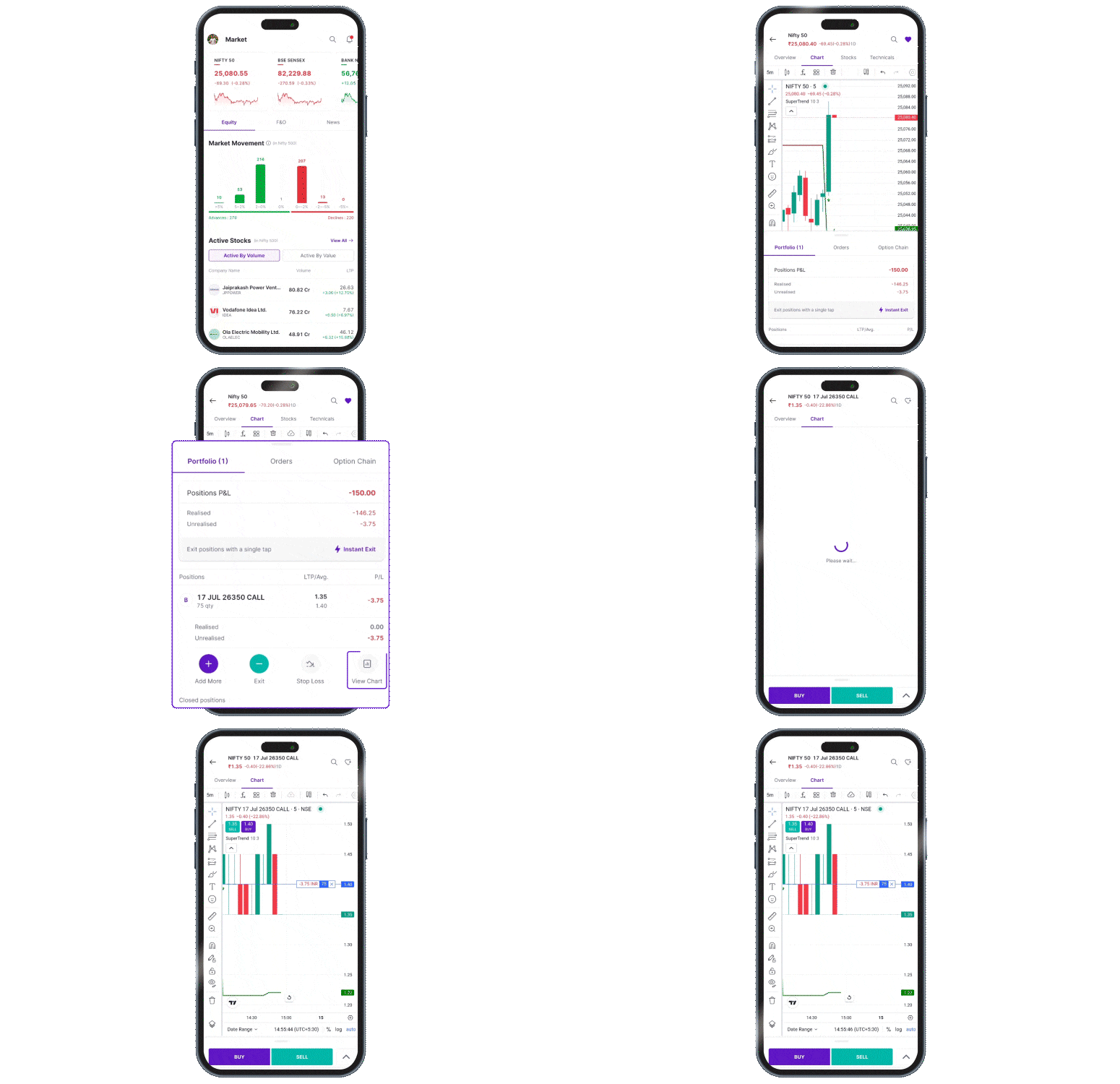
Within the Trading Panel, you can now:
- See Your P&L, Broken Down: View a clear breakup of realised and unrealised profit and loss for each position
- Jump Straight to the Chart: Use the new View Chart quick action to get to the position’s chart from the trading panel
- Be Automatically Taken to your Updated Positions: After you place an order from the Trading Panel, you’ll be redirected to your updated positions or open orders, without extra clicks.
That’s a Wrap!
We’re excited for you to experience these new features and enhancements firsthand. Each update is designed to make your trading journey smarter, smoother, and faster. We had a blast building these updates for you, and we hope that you’ll enjoy exploring them just as much. See you around!


